


Undeniable Reasons Why The Future of Web Design is RESPONSIVE
13 Feb 2017
 Mike Patel

There is a boom about Responsive Design and techies have appreciated it on a larger scale. However, what does it take to get a Responsive Design and how can it boost your Business? Take a look at how RESPONSIVE DESIGN can bring the blue sky for you.
Responsive design requires you only have one website that is coded to adapt to all screen size no matter what the device it’s being displayed on.
“So how it is different from Mobile Templates?”
A Mobile Template requires you to have a second mobile only website or sub-domain. Mobile templates are also built for each specific, not per screen size.
Mobile Usage Statistics
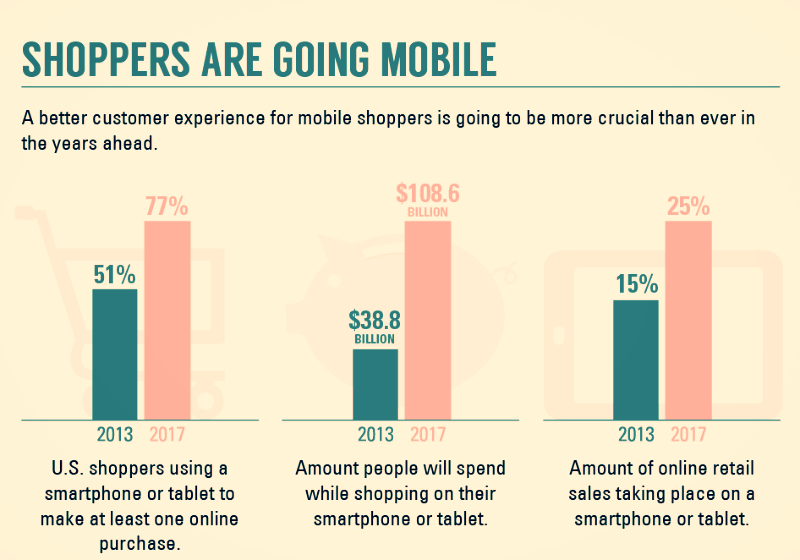
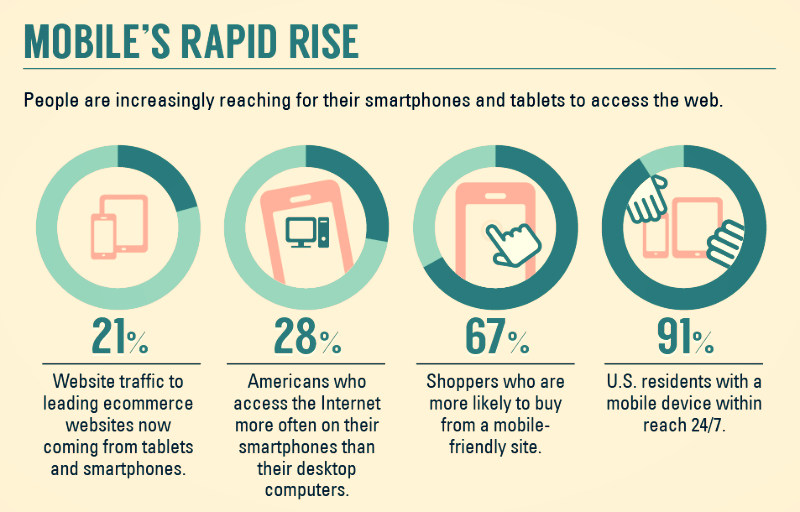
Hopefully reading through these statistics will light a fire to stop ignoring the need for a mobile website.
- Over 20% of Google searches are being performed on a mobile device.
- In 2012 more than half of the local searches were performed on a mobile device.
- In the United States, 25% of internet users only access the internet on a mobile device
- 61% of people have a better opinion of brands when they offer a good mobile experience
- 25.85% of all emails are opened on mobile phones, and 10.16% are opened on tablets.
(Via Smart Insights)
The Strategy that Scales: RESPONSIVE DESIGN
Optimized mobile experience for unlimited devices – plus those yet to be born!
The template is responsive design is designed based on screen size, not a device which will allow uniform display on all the devices.
Naturally SEO friendly, helping perform better and easier to maintain – Keep your PageRank with one website
Admitted by Google’s Pierre Farr, Google prefers responsive web design over mobile templates. Having one single URL makes it easier for Google bot to crawl your site, Google’s external link algorithm and reduces the chance of on-page SEO errors.
Aligned with best practices – Even Google recommends it.
Developments of responsive websites are aligned with best practices which will cater to taking your website to another level in the near future.
Optimized Marketing
With responsive design, you seamlessly integrate your campaigns into all mediums, from desktop to cell phones, thereby reaching more consumers and attracting more visitors.
A Speedy Responsive Website is Key
According to the Google PageSpeed Developers standards recommends that the content above the fold on a mobile device loads in under 1 second and the entire page loads in under 2 seconds. This is typically not possible when loading a desktop website on a mobile device. When a user has to wait too long for a page to load, there’s an extremely high chance they will leave your site.
Positive User Experience is Key
If a user lands on your mobile website and not happy with the experience’s a 61% chance they will leave immediately and go to another website (most likely a competitor). It’s also said that if they have a positive experience with your mobile website a user is 67% more likely to buy a product or use a service.
61% chance user will leave immediately and go to another website if they didn’t find a satisfactory experience on a mobile website. 67% more likely to buy a product or use a service if they have a positive experience. (Source Google’s ThinkInsights on Mobile)
Mike Patel

Mike Patel is the Founder and CEO of ioVista, a leading digital commerce agency specializing in eCommerce solutions. With a strong background in business and technology, Mike Patel has been at the forefront of driving digital transformations for businesses. He has successfully navigated the ever-changing landscape of eCommerce, helping companies leverage the power of online platforms to grow their brand, increase revenues, and optimize their digital presence. Under his leadership, ioVista has become a trusted partner with major technology companies: Adobe/Magento, Google, BigCommerce, Shopify, and Yahoo. He is dedicated to staying ahead of industry trends, adopting cutting-edge technologies, and continuously improving strategies to provide clients with a competitive edge. Mike’s commitment to excellence and client satisfaction is evident in every project ioVista undertakes.
Popular Posts
-

-
 Web Development
B2B Excellence Starts with Adobe Commerce (Magento) - Not WooCommerce
Mike Patel
03 Jun 2025 -
 Web Development
AI and ML in B2B: A Vision for the Future of Commerce by 2025
Mike Patel
27 May 2025 -
 Web Development
20 Next-Gen B2B eCommerce Features that will Dominate in 2025
Mike Patel
20 May 2025 -
 Web Development
WooCommerce to BigCommerce Migration Fuels Your B2B eCommerce Growth
Mike Patel
06 May 2025 -
 Web Development
Adobe Commerce SaaS: How Will It Empower Your eCommerce Business?
Mike Patel
22 Apr 2025 -
 Web Development
Leverage ERP Integration to Scale Your B2B eCommerce Business in 2025
Mike Patel
15 Apr 2025 -
 Web Development
Adobe Commerce Security Update APSB25-26: All You Need to Know
Mike Patel
10 Apr 2025 -

-
 Web Development
Why Scaling Business Should Migrate WooCommerce Stores to Shopify
Mike Patel
08 Apr 2025 -
 Web Development
Why Does Adobe Commerce (Magento) Lead the Way of B2B eCommerce
Mike Patel
18 Mar 2025 -
 Web Development
10 Key Drivers of Digital Transformation in B2B eCommerce for 2025
Mike Patel
04 Mar 2025 -
 Web Development
5 Leading eCommerce Platforms to Build Scalable B2B Customer Portals
Mike Patel
25 Feb 2025 -

-
 Web Development
Adobe Commerce Security Update APSB25-08: All You Need to Know
Mike Patel
13 Feb 2025 -

-
 Web Development
What Makes a Great Online B2B Customer Portal? Top 10 Features to Know
Mike Patel
04 Feb 2025 -
 Web Development
Legacy B2B eCommerce Systems Slowing You Down? It's Time for Modernization
Mike Patel
28 Jan 2025 -

-

-

-
 Web Development
Security Update APSB24-73 for Adobe Commerce: Everything You Need to Know
Mike Patel
14 Oct 2024 -

-

-
 Web Development
Hyvä Theme for Magento 2: Uncover Powerful Features – Evaluate Pros and Cons
Mike Patel
16 Jul 2024 -

-

-

-

-

-

-
 Web Development
It’s Official: ioVista Has Become a Recognized Adobe Specialized Partner
Mike Patel
05 Sep 2023 -

-

-
 Web Development
ioVista Announced as a 2023 Local Excellence Award Winner by UpCity
Mike Patel
09 May 2023 -

-

-

-
 Web Development
7 Proven Strategies to Increase B2B/Wholesale eCommerce Revenue
Mike Patel
01 Feb 2023 -

-

-

-
 Web Development
BigCommerce Releases StagingPro for Enterprise Merchants and Agency Developers
Mike Patel
15 Dec 2022 -

-

-
 Web Development
Universal Analytics Going Away: What Does it Mean, What you need to Do?
Mike Patel
24 Nov 2022 -
 Web Development
40% of Magento and Adobe Commerce Websites at Risk in November 2022
Mike Patel
17 Nov 2022 -

-
 Web Development
Adobe Releases Critical Security Patches for Magento 2.4.5 and 2.4.4
Mike Patel
27 Oct 2022 -

-

-
 Web Development
Magento 2 Vulnerability: Surge in Hacking on Unpatched Stores
Mike Patel
27 Sep 2022 -
 Web Development
Get your Holiday eCommerce Marketing Started with These 5 Tips
Mike Patel
15 Sep 2022 -
 Web Development
Why a Magento Code Audit is Essential for your eCommerce Store
Mike Patel
10 Sep 2022 -

-

-
 Web Development
The Challenges of eCommerce in Manufacturing and how to Overcome them
Mike Patel
17 Aug 2022 -

-

-

-

-
 Web Development
The Growth of eCommerce and its impact on the Manufacturing Industry
Mike Patel
01 Jul 2022 -

-
 Web Development
Magento Open Source Vs Commerce Vs Cloud: How to Pick your Edition
Mike Patel
14 Jun 2022 -
 Web Development
Is your Store Optimized? How do you Measure eCommerce Conversion Rates?
Mike Patel
11 May 2022 -
 Web Development
ioVista Recognized for B2B Services: Excellence Award Winner 2022
Mike Patel
03 May 2022 -

-
 Web Development
BigCommerce Strengthens Its Hold in B2B eCommerce Landscape: Acquires Bundle B2B
Mike Patel
27 Apr 2022 -

-

-
 Web Development
Adobe Commerce and Magento 1 Sites at Risk: Magento Vulnerabilities Exploited
Mike Patel
29 Mar 2022 -
 Web Development
Is Your Business Ready for Digital Transformation? The Key Steps!
Mike Patel
01 Mar 2022 -

-

-
 Web Development
Progressive Web App: A well-established Approach to Architecting a Modern Website
Mike Patel
11 Feb 2022 -

-
 Web Development
The How & Why: Successful Data-Driven Marketing for eCommerce Stores
Mike Patel
13 Jan 2022 -

-
 Web Development
5 Key Reasons to Enable Social Commerce Channels for your Store
Mike Patel
17 Dec 2021 -

-
 Web Development
Are Your FB, Instagram, Pinterest Accounts Geared for Social Shopping?
Mike Patel
30 Nov 2021 -
 Web Development
Five BFCM Strategies Merchants Love To Implement For Holidays
Mike Patel
26 Oct 2021 -
 Web Development
How to Meet Holiday Shoppers’ Needs With an Omnichannel Approach
Mike Patel
20 Oct 2021 -
 Web Development
Support for Magento Commerce 2.3 and Magento Open Source 2.3 Ends
Mike Patel
05 Oct 2021 -
 Web Development
Why your Business Needs Marketing Automation this Holiday Season
Mike Patel
30 Sep 2021 -
 Web Development
How Augmented Reality can Deliver more Engaging Shopping Experiences
Mike Patel
21 Sep 2021 -
 Web Development
These 5 Local Business Marketing Strategies Will Transform Your Business
Mike Patel
17 Sep 2021 -

-

-

-










Let’s work together to create outstanding digital experiences.
With 20+ years of industry experience, ioVista understands your eCommerce needs and delivers best-in-class solutions that help you gain a competitive edge.
or Call us at: +1 214-699-4391

TOP
Get in Touch