


Six Ways to Get More Sales in January
31 Dec 2014
 Mike Patel

 After the holiday spending spree, even an average month can seem slow and most retailers have come to expect sales to take a dive in January. But this isn’t written in stone…
While it can be a great month to catch up on the things you could never seem to get to during the holiday rush, it can still be a great sales month, too. This article will cover several ways to keep the momentum from December going. Depending on what you sell, you could mix and match a few of these ideas or even implement them all fairly quickly.
1. Loosen your return policy.
Return policies are important but as anyone with big December sales knows, January is a month of returns. But as much as it stings to take those sales back, it gives you an opportunity to make a great impression on a potential new customer or even get a greater sale. The gift they got might not have worked out, but something else you sell may be just what they’re looking for. In fact, if you issue them store credit, they’re likely to browse your site until they find something they do want – and it just might be more expensive than the original item. The more lenient you are with someone who wants to return an item, the more likely they will have a favorable impression of you. It’s true that they might not buy something else that day, but they could buy something later or at least, never say anything bad about your business.
2. Create a special after-holiday sale.
You might not sell Christmas decorations but that doesn’t mean you can’t get in on the after holiday sales bandwagon. Most big chain retailers immediately set up a clearance section right after the holidays – and the majority of consumers plan to shop these sales. According to a survey by RetailmeNot.com…
81% of consumers surveyed said they planned to shop the year-end clearance sales and 63% of those consumers planned to shop for themselves.
For brick and mortar stores, retailers usually put these clearance sales in a prominent place so customers can’t miss them. You should think the same way for your website – highlight your clearance sale on your homepage with a banner or obvious link to those items.
3. Create a “resolution” category.
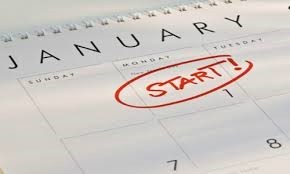 It’s the new year and everyone’s thinking about ways they want to make this year better than their last – it’s resolution time. If you sell any products that can help people reach their goals, why not highlight them with a special “resolution” category? Anything related to weight loss, fitness and eating healthier comes to mind but people have all sorts of resolutions. Think about your products and how they might help someone have a better year and market them that way.
4. Highlight accessories.
Just about any gift can use additional items to make it complete. Video game systems need games, skis need cold weather clothing, crockpots need cookbooks, bikes need bike locks…the list goes on and on. Your customers might have their big-ticket items but they’ll be on the lookout for accessories in January. Think about the ways your products could compliment other products and highlight that on your site. Just like the resolution category, you could create a special “accessories” category or sale for these type of “add-on” items.
5. Boost your PPC and PLA spending.
If you’re anticipating a low sales month, one of the easiest ways to help boost your traffic and sales is with paid search advertising. If you’re already using paid search, consider spending a little more in January to make up for the dip in post-holiday traffic. If you’re not using paid search, this would be a great time to try it and see what kind of difference it makes for you.
6. Add a “Wish List” or “Buy it Later” feature.
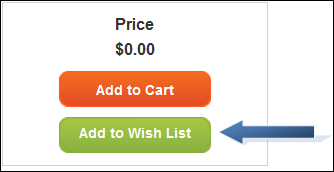 For a lot of consumers, December stretched their budget to the limit and they can’t really afford to spend their disposable income in January – but that doesn’t stop them from looking, especially online. This opens up a perfect opportunity to capture email addresses and find out what your customers want to buy and email them special promotions or reminders about those items in the future. Not only does this help you grow your email marketing list, it also helps increase the odds that those customers will return to your site when they can make a purchase. Maybe you won’t get the sale in January – but you could get it in February.
Mike Patel

Mike Patel is the Founder and CEO of ioVista, a leading digital commerce agency specializing in eCommerce solutions. With a strong background in business and technology, Mike Patel has been at the forefront of driving digital transformations for businesses. He has successfully navigated the ever-changing landscape of eCommerce, helping companies leverage the power of online platforms to grow their brand, increase revenues, and optimize their digital presence. Under his leadership, ioVista has become a trusted partner with major technology companies: Adobe/Magento, Google, BigCommerce, Shopify, and Yahoo. He is dedicated to staying ahead of industry trends, adopting cutting-edge technologies, and continuously improving strategies to provide clients with a competitive edge. Mike’s commitment to excellence and client satisfaction is evident in every project ioVista undertakes.
Popular Posts
-

-
 Digital Marketing
B2B Excellence Starts with Adobe Commerce (Magento) - Not WooCommerce
Mike Patel
03 Jun 2025 -
 Digital Marketing
AI and ML in B2B: A Vision for the Future of Commerce by 2025
Mike Patel
27 May 2025 -
 Digital Marketing
20 Next-Gen B2B eCommerce Features that will Dominate in 2025
Mike Patel
20 May 2025 -
 Digital Marketing
WooCommerce to BigCommerce Migration Fuels Your B2B eCommerce Growth
Mike Patel
06 May 2025 -
 Digital Marketing
Adobe Commerce SaaS: How Will It Empower Your eCommerce Business?
Mike Patel
22 Apr 2025 -
 Digital Marketing
Leverage ERP Integration to Scale Your B2B eCommerce Business in 2025
Mike Patel
15 Apr 2025 -
 Digital Marketing
Adobe Commerce Security Update APSB25-26: All You Need to Know
Mike Patel
10 Apr 2025 -

-
 Digital Marketing
Why Scaling Business Should Migrate WooCommerce Stores to Shopify
Mike Patel
08 Apr 2025 -
 Digital Marketing
Why Does Adobe Commerce (Magento) Lead the Way of B2B eCommerce
Mike Patel
18 Mar 2025 -
 Digital Marketing
10 Key Drivers of Digital Transformation in B2B eCommerce for 2025
Mike Patel
04 Mar 2025 -
 Digital Marketing
5 Leading eCommerce Platforms to Build Scalable B2B Customer Portals
Mike Patel
25 Feb 2025 -

-
 Digital Marketing
Adobe Commerce Security Update APSB25-08: All You Need to Know
Mike Patel
13 Feb 2025 -

-
 Digital Marketing
What Makes a Great Online B2B Customer Portal? Top 10 Features to Know
Mike Patel
04 Feb 2025 -
 Digital Marketing
Legacy B2B eCommerce Systems Slowing You Down? It's Time for Modernization
Mike Patel
28 Jan 2025 -

-

-

-
 Digital Marketing
Security Update APSB24-73 for Adobe Commerce: Everything You Need to Know
Mike Patel
14 Oct 2024 -

-

-
 Digital Marketing
Hyvä Theme for Magento 2: Uncover Powerful Features – Evaluate Pros and Cons
Mike Patel
16 Jul 2024 -
 Digital Marketing
Magento 2.4.7: Explore the Newest Enhancements and Features
Mike Patel
30 Apr 2024 -

-

-

-

-

-
 Digital Marketing
It’s Official: ioVista Has Become a Recognized Adobe Specialized Partner
Mike Patel
05 Sep 2023 -

-

-
 Digital Marketing
ioVista Announced as a 2023 Local Excellence Award Winner by UpCity
Mike Patel
09 May 2023 -

-

-

-
 Digital Marketing
7 Proven Strategies to Increase B2B/Wholesale eCommerce Revenue
Mike Patel
01 Feb 2023 -

-

-

-
 Digital Marketing
BigCommerce Releases StagingPro for Enterprise Merchants and Agency Developers
Mike Patel
15 Dec 2022 -
 Digital Marketing
Adobe discontinues Support for the 2.4.0-2.4.3 Release Line
Mike Patel
09 Dec 2022 -

-
 Digital Marketing
Universal Analytics Going Away: What Does it Mean, What you need to Do?
Mike Patel
24 Nov 2022 -
 Digital Marketing
40% of Magento and Adobe Commerce Websites at Risk in November 2022
Mike Patel
17 Nov 2022 -

-
 Digital Marketing
Adobe Releases Critical Security Patches for Magento 2.4.5 and 2.4.4
Mike Patel
27 Oct 2022 -

-
 Digital Marketing
ioVista is Sponsoring the Largest eCommerce Event in Dallas
Mike Patel
07 Oct 2022 -
 Digital Marketing
Magento 2 Vulnerability: Surge in Hacking on Unpatched Stores
Mike Patel
27 Sep 2022 -
 Digital Marketing
Get your Holiday eCommerce Marketing Started with These 5 Tips
Mike Patel
15 Sep 2022 -
 Digital Marketing
Why a Magento Code Audit is Essential for your eCommerce Store
Mike Patel
10 Sep 2022 -

-

-
 Digital Marketing
The Challenges of eCommerce in Manufacturing and how to Overcome them
Mike Patel
17 Aug 2022 -
 Digital Marketing
Adobe Releases Magento Open Source and Adobe Commerce 2.4.5
Mike Patel
10 Aug 2022 -

-

-

-
 Digital Marketing
The Growth of eCommerce and its impact on the Manufacturing Industry
Mike Patel
01 Jul 2022 -

-
 Digital Marketing
Magento Open Source Vs Commerce Vs Cloud: How to Pick your Edition
Mike Patel
14 Jun 2022 -
 Digital Marketing
Is your Store Optimized? How do you Measure eCommerce Conversion Rates?
Mike Patel
11 May 2022 -
 Digital Marketing
ioVista Recognized for B2B Services: Excellence Award Winner 2022
Mike Patel
03 May 2022 -

-

-
 Digital Marketing
Adobe Commerce 2.4.4 Release: Faster, Better, More Scalable
Mike Patel
13 Apr 2022 -
 Digital Marketing
Adobe Commerce and Magento 1 Sites at Risk: Magento Vulnerabilities Exploited
Mike Patel
29 Mar 2022 -
 Digital Marketing
Is Your Business Ready for Digital Transformation? The Key Steps!
Mike Patel
01 Mar 2022 -

-

-

-
 Digital Marketing
The How & Why: Successful Data-Driven Marketing for eCommerce Stores
Mike Patel
13 Jan 2022 -

-
 Digital Marketing
5 Key Reasons to Enable Social Commerce Channels for your Store
Mike Patel
17 Dec 2021 -
 Digital Marketing
ioVista is honored to be one of the Top 1000 Companies 2021
Mike Patel
13 Dec 2021 -
 Digital Marketing
Are Your FB, Instagram, Pinterest Accounts Geared for Social Shopping?
Mike Patel
30 Nov 2021 -
 Digital Marketing
Five BFCM Strategies Merchants Love To Implement For Holidays
Mike Patel
26 Oct 2021 -
 Digital Marketing
How to Meet Holiday Shoppers’ Needs With an Omnichannel Approach
Mike Patel
20 Oct 2021 -
 Digital Marketing
Support for Magento Commerce 2.3 and Magento Open Source 2.3 Ends
Mike Patel
05 Oct 2021 -
 Digital Marketing
Why your Business Needs Marketing Automation this Holiday Season
Mike Patel
30 Sep 2021 -
 Digital Marketing
How Augmented Reality can Deliver more Engaging Shopping Experiences
Mike Patel
21 Sep 2021 -
 Digital Marketing
These 5 Local Business Marketing Strategies Will Transform Your Business
Mike Patel
17 Sep 2021 -

-

-

-












Let’s work together to create outstanding digital experiences.
With 20+ years of industry experience, ioVista understands your eCommerce needs and delivers best-in-class solutions that help you gain a competitive edge.
or Call us at: +1 214-699-4391

TOP
Get in Touch