


How to seriously compete with Amazon this holiday season
15 Oct 2014
 Mike Patel

There’s a huge opportunity to compete with Amazon this holiday season – and it’s not going to cost you much.
Traditionally, Amazon has been one of the largest paid search advertisers on Google but that was before Google launched Product Listing Ads (recently renamed Google Shopping).
As of right now, and since Product Listing Ads (PLA) launched in 2012 – Amazon.com has not purchased one. Some of their subsidiaries buy product listing ads, as do their merchants but Amazon itself has not bought one. It’s speculated that Amazon does not want to pay Google for something that is essentially attracting customers away from their site. They’re choosing not to compete this way.
How does this help YOUR business get more sales?
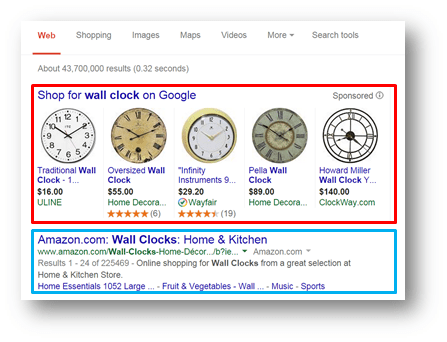
If you use PLAs for your products, Amazon’s products will not show up in the side by side comparison that PLAs create. Amazon still buys ads – but they buy the text ads. For example, if you search for “wall clock” on Google, you can see that five separate retailers show up while Amazon simply has a text ad below – which does get traffic but not nearly as much.
Searchers are 34% more likely to click on a PLA than a text ad.
 So, let’s say you’re one of the retailers that sell clocks in the example above. Anyone searching for a wall clock on Google would be much more likely to click on your ad, over Amazon’s. Even taking Amazon out of the equation, you’re still ahead of a lot of competition simply by having your products show up in this format in the first place. No matter how your website ranks in a search, these paid ads always appear at the top of the page.
89% of consumers use search engines to find information on products or services prior to making a purchase.
The fact is, your customers are using the internet to comparison shop. It’s easier than ever to compare prices or designs in an instant – they can and do simply look up whatever they want with Google. If you use PLAs, your products will appear right at the top of their search screen. Amazon might have ads too – but they’ll show up BELOW yours as text ads.
For every $1 spent, you can expect about $9 in returns.
 You do have to pay Google for PLAs but research shows that they’re very profitable. Unlike text ads, they actually show customers an image of your product right in the search screen. This is the perfect way to reach customers who have never heard of your store. Remember, these are searches for products. If your store sells what someone is looking for and it shows up at the top of their search – you stand a great chance of making that sale. If you decide to invest in PLAs, now is the best time to do it. The busiest shopping season of the year is rapidly approaching and analysts believe the 2014 holiday season is going to be the largest online shopping season to date. Even outside of the holiday season, PLAs are a great way to get more sales and exposure online.
Mike Patel

Mike Patel is the Founder and CEO of ioVista, a leading digital commerce agency specializing in eCommerce solutions. With a strong background in business and technology, Mike Patel has been at the forefront of driving digital transformations for businesses. He has successfully navigated the ever-changing landscape of eCommerce, helping companies leverage the power of online platforms to grow their brand, increase revenues, and optimize their digital presence. Under his leadership, ioVista has become a trusted partner with major technology companies: Adobe/Magento, Google, BigCommerce, Shopify, and Yahoo. He is dedicated to staying ahead of industry trends, adopting cutting-edge technologies, and continuously improving strategies to provide clients with a competitive edge. Mike’s commitment to excellence and client satisfaction is evident in every project ioVista undertakes.
Popular Posts
-

-
 E-Commerce
B2B Excellence Starts with Adobe Commerce (Magento) - Not WooCommerce
Mike Patel
03 Jun 2025 -

-

-
 E-Commerce
WooCommerce to BigCommerce Migration Fuels Your B2B eCommerce Growth
Mike Patel
06 May 2025 -

-
 E-Commerce
Leverage ERP Integration to Scale Your B2B eCommerce Business in 2025
Mike Patel
15 Apr 2025 -

-

-

-

-
 E-Commerce
10 Key Drivers of Digital Transformation in B2B eCommerce for 2025
Mike Patel
04 Mar 2025 -
 E-Commerce
5 Leading eCommerce Platforms to Build Scalable B2B Customer Portals
Mike Patel
25 Feb 2025 -

-

-

-
 E-Commerce
What Makes a Great Online B2B Customer Portal? Top 10 Features to Know
Mike Patel
04 Feb 2025 -
 E-Commerce
Legacy B2B eCommerce Systems Slowing You Down? It's Time for Modernization
Mike Patel
28 Jan 2025 -

-

-

-
 E-Commerce
Security Update APSB24-73 for Adobe Commerce: Everything You Need to Know
Mike Patel
14 Oct 2024 -

-

-
 E-Commerce
Hyvä Theme for Magento 2: Uncover Powerful Features – Evaluate Pros and Cons
Mike Patel
16 Jul 2024 -

-

-

-

-

-

-
 E-Commerce
It’s Official: ioVista Has Become a Recognized Adobe Specialized Partner
Mike Patel
05 Sep 2023 -

-

-
 E-Commerce
ioVista Announced as a 2023 Local Excellence Award Winner by UpCity
Mike Patel
09 May 2023 -

-

-

-

-

-

-

-
 E-Commerce
BigCommerce Releases StagingPro for Enterprise Merchants and Agency Developers
Mike Patel
15 Dec 2022 -

-

-
 E-Commerce
Universal Analytics Going Away: What Does it Mean, What you need to Do?
Mike Patel
24 Nov 2022 -
 E-Commerce
40% of Magento and Adobe Commerce Websites at Risk in November 2022
Mike Patel
17 Nov 2022 -
 E-Commerce
Website Support: How Can ioVista Help keep your Store Up and Running During Holidays
Mike Patel
17 Nov 2022 -

-
 E-Commerce
Adobe Releases Critical Security Patches for Magento 2.4.5 and 2.4.4
Mike Patel
27 Oct 2022 -

-

-

-

-

-

-

-
 E-Commerce
How BigCommerce makes it easy for Legacy Businesses to get started with B2B eCommerce
Mike Patel
23 Aug 2022 -
 E-Commerce
The Challenges of eCommerce in Manufacturing and how to Overcome them
Mike Patel
17 Aug 2022 -

-

-

-

-
 E-Commerce
The Growth of eCommerce and its impact on the Manufacturing Industry
Mike Patel
01 Jul 2022 -

-
 E-Commerce
Magento Open Source Vs Commerce Vs Cloud: How to Pick your Edition
Mike Patel
14 Jun 2022 -
 E-Commerce
Is your Store Optimized? How do you Measure eCommerce Conversion Rates?
Mike Patel
11 May 2022 -

-

-
 E-Commerce
BigCommerce Strengthens Its Hold in B2B eCommerce Landscape: Acquires Bundle B2B
Mike Patel
27 Apr 2022 -

-

-
 E-Commerce
BigCommerce Releases Multi-Storefront: Multiple Brand Management within a Single Store
Mike Patel
01 Apr 2022 -
 E-Commerce
Adobe Commerce and Magento 1 Sites at Risk: Magento Vulnerabilities Exploited
Mike Patel
29 Mar 2022 -

-
 E-Commerce
ioVista named as Dallas’ most Recommended and Reviewed Digital Strategy Companies 2022
Mike Patel
24 Feb 2022 -

-

-
 E-Commerce
Progressive Web App: A well-established Approach to Architecting a Modern Website
Mike Patel
11 Feb 2022 -

-
 E-Commerce
How to Improve Internal Site Search for Better Mobile Conversions: 7 Proven Strategies
Mike Patel
27 Jan 2022 -
 E-Commerce
The How & Why: Successful Data-Driven Marketing for eCommerce Stores
Mike Patel
13 Jan 2022 -

-

-

-
 E-Commerce
Are Your FB, Instagram, Pinterest Accounts Geared for Social Shopping?
Mike Patel
30 Nov 2021 -

-

-

-

-
 E-Commerce
How Augmented Reality can Deliver more Engaging Shopping Experiences
Mike Patel
21 Sep 2021 -
 E-Commerce
These 5 Local Business Marketing Strategies Will Transform Your Business
Mike Patel
17 Sep 2021 -

-

-

-





Let’s work together to create outstanding digital experiences.
With 20+ years of industry experience, ioVista understands your eCommerce needs and delivers best-in-class solutions that help you gain a competitive edge.
or Call us at: +1 214-699-4391

TOP
Get in Touch